

Departments and queues
A department menu on WhatsApp and automatic distribution by round robin or by who is most available.
AI-powered WhatsApp CRM
atendIA brings WhatsApp, Instagram, Messenger and email into one inbox, keeps your team organized, and lets an AI reply, qualify leads and book appointments 24 hours a day. The AI cost is included in your plan.
Companies in Brazil, in telecom, healthcare, finance and legal, have served their customers with atendIA



 Vita Implantes
 Abrão & Silva Advogados
 Cliom
CliomAI Copilot
An assistant inside the dashboard that knows your business. Ask in a chat and it builds departments, services, hours, pipelines and your AI. Nothing changes until you approve it.
Included in Essential and ProfessionalPick a request and watch the Copilot work
Request: I run a dental clinic. Dr. Helena does implant consultations, 40 minutes, $150. We're open Monday to Friday, 8 am to 6 pm.
Copilot's answer: I prepared the setup from what you told me. Review it and apply it whenever you want.
Proposal: Add Dr. Helena, the consultation and your business hours. Staff: Dr. Helena; Service: Implant consultation, 40 min, $150; Hours: Monday to Friday, 8 am to 6 pm
By text, by voice note or by sending the PDF of your price list.
It checks how your business runs and shows exactly what will change.
Nothing changes before you click Apply, and every version stays in the history.
Why atendIA
What changes when your channels, your team and your AI work in one place.
Without atendIA
With atendIA
Product
Everything your team uses every day, in a dashboard that opens in your browser.
Inbox
Each message lands in the same place, with the full customer history, no matter where they wrote from. Your team works together, without fighting over a phone.
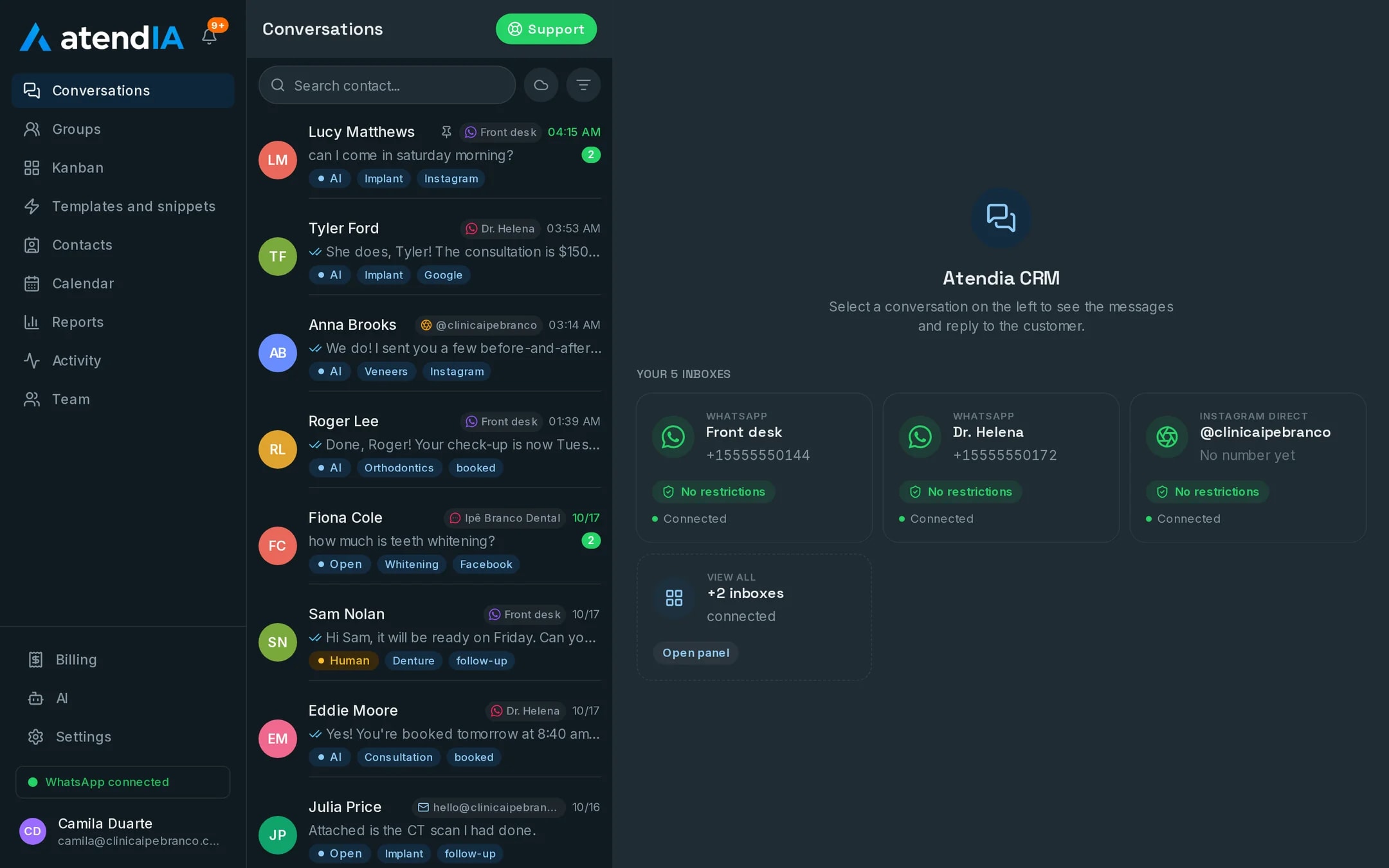
Artificial intelligence
It replies in your company voice, understands voice notes, checks services and prices, and books the time right in the conversation. When a person is needed, it hands over and alerts your team.
Sales pipeline
Build pipelines with the stages of your process and drag the customer to the next column as the sale moves forward. Your whole team sees the same board.
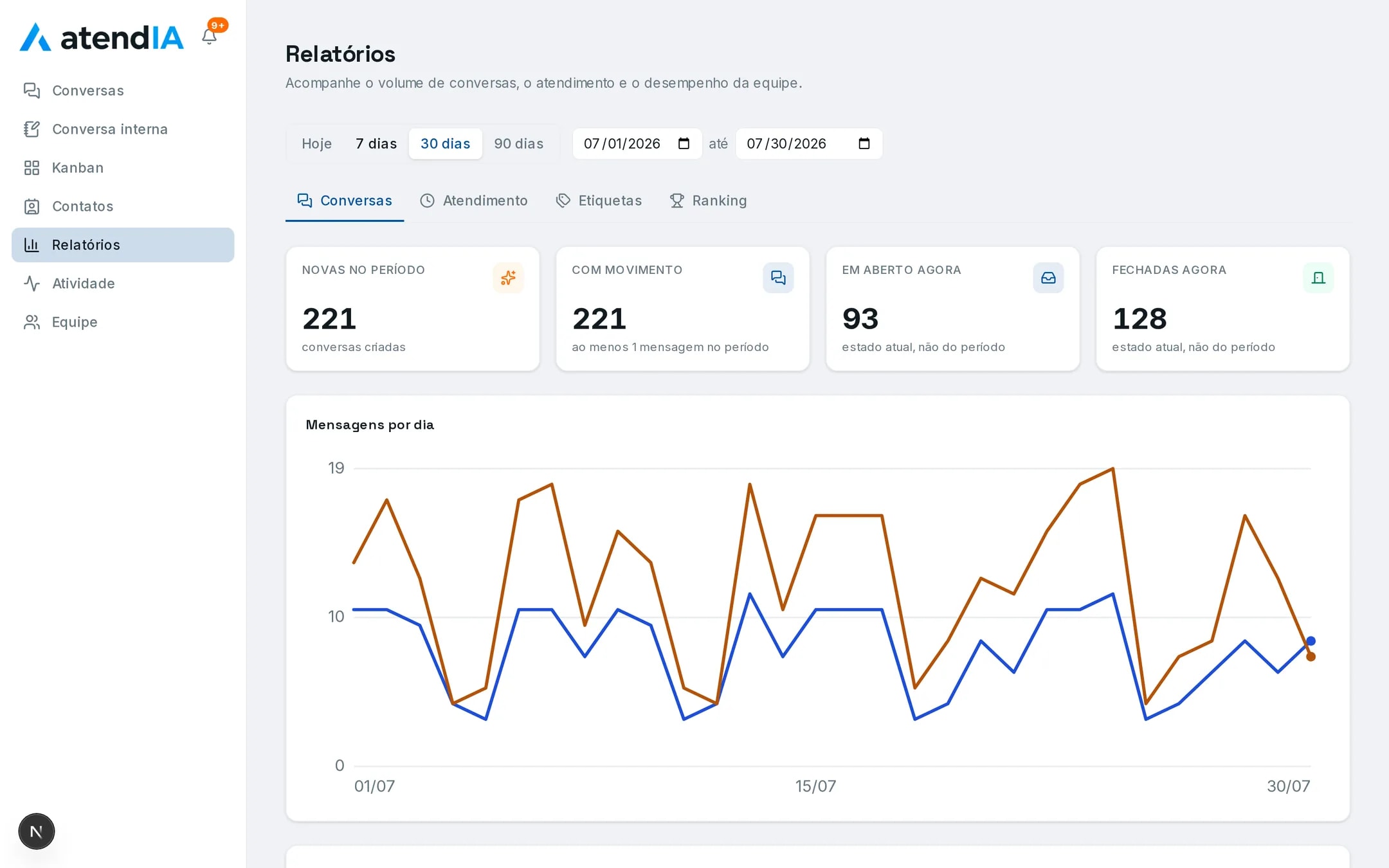
Management
Track new, open and closed conversations, how each agent is doing, and what happened in every conversation.
Features
A department menu on WhatsApp and automatic distribution by round robin or by who is most available.
Provider, room and duration per service, with no double booking. It shows up in Google, Apple or Outlook.
WhatsApp templates and ready-made snippets so your team can reply in one click.
A contact base with history and labels, WhatsApp groups and internal team rooms.
Add everyone who handles customers. The plan price does not change per user.
Nothing to install. It works on any computer, with no technician and no server.
Integrate with your own system through a documented API and webhooks for messages, contacts and appointments.
Getting started
In a few minutes your company is serving customers with atendIA.
Sign up with your company details. 7 days free, no credit card.
Scan the QR code, just like WhatsApp Web. Your number and conversations stay the same.
Tell it how your company works and it starts replying in your voice.
7 days free, no credit card
Return
Adjust it with your own numbers. Every assumption can be changed.
Revenue at stake per month
$2,016
2.5 sales a month that are lost today because the contact wrote after hours and got no reply.
The Professional plan costs $199/month. With your numbers, it pays for itself 10.1× over and still leaves $1,817 a month.
No credit card.
Estimate based on the assumptions above, not a promise of results.
Pricing
For Black Friday, the yearly plan is 20% off the first year, paid at signup. Rather try it first? Monthly comes with 7 days free, no credit card. On plans with AI, we cover the AI cost.
Organize your team's customer service.
$470.40 paid upfront for the first year
For teams that reply by hand and want every channel in one place.
AI starts at Essential
Paid at signup, 7 days to cancel for a full refund
AI replying 24 hours a day.
$950.40 paid upfront for the first year
For teams that need to reply fast, even after hours.
We cover the AI cost. You do not create an OpenAI account and you do not pay per message it answers.
AI that checks prices and books is on Professional
Paid at signup, 7 days to cancel for a full refund
AI that checks prices and books.
$1,910.40 paid upfront for the first year
For teams that want a full calendar without relying on the front desk.
The AI checks services, prices and open slots and books the appointment right in the conversation. And we cover its cost.
Paid at signup, 7 days to cancel for a full refund
Black Friday yearly plan: a single payment at signup, instead of the free trial. The 20% discount applies to the first year and it renews at the full yearly price. You have 7 days to cancel for a full refund.
Compare
Every feature side by side. Tap the rows with a dotted underline to see the details.
| Feature | Basic$49/mo | Essential$99/mo | Professional$199/mo |
|---|---|---|---|
| Customer service | |||
| All your company numbers in one inbox | |||
| Team members working together | Unlimited | Unlimited | Unlimited |
| Opens in your browser, nothing to install | |||
| Instagram, Messenger and email in the same inbox | |||
| Department menu and automatic queues | |||
| WhatsApp templates and ready-made replies | |||
| Automatic setup from the signup form | |||
| AI replying in your company voice, 24 hours a day | |||
| AI cost included in the plan | |||
| You edit the AI text in the dashboard | |||
| Switch between AI and a person with one click | |||
| Group alert when a chat goes to a person and when it closes | |||
| Human support | Included | Included | Priority |
| Messages per month | Unlimited | Unlimited | Unlimited |
| Calendar | |||
| Calendar with provider, room and duration | |||
| Calendar subscription in Google, Apple or Outlook | |||
| The AI checks open slots and BOOKS in the conversation | |||
| The AI checks your services, prices and duration | |||
| Conversation intelligence | |||
| AI Copilot that sets up the CRM in one chat | |||
| Understands the voice notes customers send | |||
| Rules for when to stop and hand over to a person | |||
| Management and numbers | |||
| Report on new leads, closings and conversion | |||
| Visual pipeline to drag customers between stages | |||
| Labels, filters and history search | |||
| A log of who did what in each conversation | |||
| Which ad each conversation came from | |||
| Add-ons, on any plan | |||
| API and webhooks to integrate with your system | Add-on | Add-on | Add-on |
Security and privacy
Customer service involves personal data. That is why atendIA is built with isolation per company.
See how we handle dataEach company data is kept isolated in the database. One account never sees another.
Your customers messages are not used to train artificial intelligence models.
Data export and deletion on request, with a named contact in the privacy policy.
Support is handled by real people, with a reply the same business day.
FAQ
What companies ask before they start.
Still have questions?
Talk to a specialist on WhatsApp. We reply the same business day.
Chat on WhatsAppFor data and privacy, see our Privacy Policy.
No. Signing up only asks for your company details, phone, email and password. The 7 days are free, and billing only starts if you decide to continue. You cancel from the dashboard itself.
You connect WhatsApp yourself by scanning a QR code, with up to 10 numbers. Instagram, Messenger, Gmail and WhatsApp through the official Meta API are connected by our team, together with you. Everything lands in the same inbox.
Yes. The dashboard works like WhatsApp with more features: conversations on the left, the open conversation next to them and the pipeline as a drag and drop board. Your team starts answering the same day, with no formal training.
You fill in a form about your business: what you sell, prices, opening hours and what it must never promise. The AI starts answering from that, and its instructions stay editable in the dashboard.
No. On the Essential and Professional plans the AI cost is already in the plan price. You do not create an OpenAI account, paste an API key or get a usage bill, not even in the month it answers the most. The Basic plan has no AI.
It answers within the rules you set, including what it must never promise and when to hand over to a person. On the Professional plan, price and duration come from your service catalog, not from a guess.
The calendar lives in atendIA, with the professional, room and duration of each service. In Google Calendar, Apple or Outlook you subscribe to it through a private link, and the slots show up next to your own events.
No. Messages are unlimited on every plan, and you add as many users as you need, with no per seat cost.
No. You connect the number you already use, and conversations stay the same for your customers.
Service through the QR code works like WhatsApp Web, with your usual number. Bans come from bulk messages to people who never asked to be contacted, which atendIA does not do. And for maximum safety, we connect the number through the official Meta API.
Yes. atendIA has a documented API and webhooks for messages, contacts and appointments, available as an add-on on any plan.
At any time, from the dashboard. Moving to a bigger plan takes effect right away; to a smaller one, on the next billing cycle.
It is isolated per company in the database and is never used to train AI models. You can export it or ask for it to be deleted at any time.
Try atendIA for 7 days with your team and your customers. No credit card, no long-term contract.
Cancel from the dashboard, anytime.